

TREND FOR

MINIATURIZATION

10 Best Smart Lectern Options for Global Buyers?

Choosing among the 10 Best Smart Lectern Options for Global Buyers requires more than comparing screens, microphones, and polished finishes. A reliable Smart Lectern should support clear teaching, stable presentations, remote collaboration, and simple daily control. It should also fit local power standards, network conditions, accessibility expectations, and service availability. The 2023 UNESCO Global Education Monitoring Report highlights a critical reality: technology improves education only when infrastructure, teacher capability, and effective governance develop together. In many regions, electricity and internet access remain inconsistent. Buyers therefore need practical specifications, not attractive demonstrations alone.

Industry evidence reinforces this careful approach. The ITU Facts and Figures 2023 report estimated that 67% of the world’s population was online, leaving billions without dependable connectivity. The 2024 EDUCAUSE Horizon Report also identifies artificial intelligence, digital learning ecosystems, and cybersecurity as important influences on teaching and learning. These trends make device compatibility, data protection, and long-term software support increasingly important. However, no ranking can perfectly reflect every classroom, conference hall, or public institution. That is the uncomfortable part. A lectern that performs well in Singapore may need different ports, voltage support, language settings, or maintenance planning in Kenya, Germany, or Brazil. This guide compares leading options through a global buyer’s lens, considering display quality, audio control, camera integration, mobility, ergonomics, warranty coverage, and total ownership cost. Some specifications may change after publication. Readers should verify regional certifications and supplier commitments before purchasing. The best choice is not always the most advanced model. It is the one that remains dependable when the presentation begins, the network weakens, and support is far away.
10 Best Smart Lectern Options for Global Buyers?

What Is a Smart Lectern and How Does It Work?

10 Best Smart Lectern Options for Global Buyers?

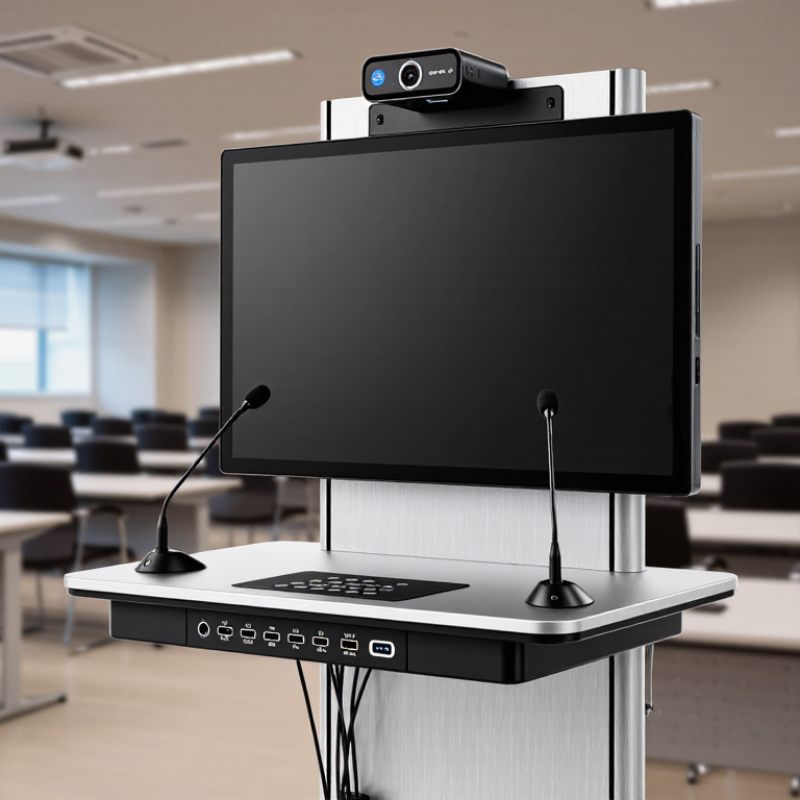
A smart lectern is a presentation desk with built-in digital teaching tools. It usually combines a touchscreen, computer, microphone, camera, speakers, and connection ports. Some models also include document cameras and wireless presentation systems.

The control panel lets presenters switch sources, annotate slides, adjust sound, and manage video calls. In a typical classroom, one cable connects the lectern to a display. The internal processor then coordinates images, audio, and network access. A digital signal processor reduces microphone noise. Automated controls can also lower setup time.

This equipment supports hybrid teaching, public presentations, and professional training. The World Economic Forum’s Future of Jobs Report 2023 states that 44% of workers’ skills may be disrupted by 2027. It also estimates that six in ten workers will need training before then.

These figures strengthen the case for flexible presentation spaces. A smart lectern can help instructors combine live explanation, recorded content, and remote participation.

However, integration is rarely perfect. A fast processor cannot fix poor room acoustics or unstable internet. That detail is often underestimated.

Tips: Check touch response, microphone pickup, operating-system compatibility, and service access before buying. Test the lectern with your actual displays and video platform. Choose replaceable cables and clear control labels. A beautiful interface may still confuse first-time users. Ask for hands-on training and written maintenance procedures. Rescue plans matter when technology fails.

Key Features Global Buyers Should Evaluate

10 Best Smart Lectern Options for Global Buyers

Global buyers should evaluate reliability before decorative features. A smart lectern may include a touch display, document camera, microphone control, and wireless presentation. Yet every feature must support real teaching or conference work. AVIXA’s 2024 Industry Outlook estimates the professional audiovisual market will reach about $325 billion in 2024. That growth increases choice, but also creates specification confusion. Check screen brightness, viewing angles, fan noise, cable access, and heat control. A bright display can still fail in a sunlit room.

Compatibility deserves careful testing. Confirm support for common video inputs, network standards, captioning, hearing assistance, and multilingual interfaces. Accessibility should not be an afterthought. The control panel needs clear labels and usable contrast. Security matters too. The 2024 Verizon Data Breach Investigations Report analyzed more than 30,000 incidents and linked human factors to 68% of breaches. Choose role-based access, encrypted connections, signed firmware, and remote update controls. Do not trust a sealed specification sheet. Ask for a live demonstration and service response times in your region.

Tips: Test the lectern with your own laptop, cables, microphones, and room lighting. Measure setup time. Ask whether replacement parts remain available after three years. Calculate total ownership cost, including training, software, shipping, and local maintenance. A lower purchase price may become expensive. I have seen elegant systems overlooked because one small adapter was unavailable. That detail matters.

Ten Leading Smart Lectern Options Compared

Ten Leading Smart Lectern Options Compared

Global buyers can compare ten smart lectern types by function, not appearance. An all-in-one model combines a display, microphone, speakers, and control panel. A motorized lectern adjusts height for different presenters. Compact models suit classrooms with limited floor space. Modular units allow buyers to replace damaged screens or control boards.

Touchscreen lecterns support slide changes, room control, and live annotations. Translation-ready models may connect with interpretation systems and multiple audio channels. Hybrid lecterns handle both physical documents and digital presentations. Wheelchair-accessible designs provide clearer front access and adjustable controls. Rugged models suit touring events, although extra protection can increase weight. Premium integrated units offer cleaner installation but often require trained technicians.

A reliable comparison should check screen brightness, microphone pickup, cable access, ventilation, and software compatibility. Buyers should also confirm voltage requirements and local service coverage. In practical venue testing, small control delays can disrupt a speech. Fan noise can become noticeable during quiet sessions. These details matter more than polished product images. My preferred option changes with the room, audience, and support budget. No single lectern fits every market. A lower-cost model may perform well, but its replacement parts could be difficult to source. Testing one sample with real presentation files remains wise before placing a large international order.

Best Smart Lecterns for Different Venues and Budgets

Smart lecterns vary widely in price, size, and technical capability. The best choice depends on the venue, audience, and daily workload. A compact model suits classrooms, training rooms, and small community halls. Look for a clear display, adjustable height, built-in microphone, and simple cable access.

Medium-budget lecterns work well in conference rooms and houses of worship. They often include touch controls, document cameras, wireless presentation support, and stronger internal speakers. For large auditoriums, choose a robust lectern with bright dual displays, stable network connections, and sufficient ventilation. Test the viewing angle from the back row. A feature can look impressive but remain useless from twenty meters away. I have found that complicated controls often slow presenters during live events. That deserves honest attention.

Tips: Match the lectern to the room before comparing specifications. Measure doorway widths, stage depth, and nearby power points. Ask whether staff can operate the system after brief training. For limited budgets, prioritize microphone quality, display readability, and reliable connectivity over decorative panels. For international venues, check voltage compatibility and language settings. Keep spare cables available. Small failures become very visible. Also review service access, warranty terms, and software update policies. A cheaper lectern may cost more when repairs require specialist support. Try a real presentation test, including videos, notes, and audience questions, before making the final decision.

10 Best Smart Lectern Options for Global Buyers

Indicative planning benchmarks for different venues and budgets. Prices are estimated in USD and reflect typical configuration levels rather than any specific brand or supplier.

The chart compares common smart lectern configurations by estimated purchase budget and integrated display size. Entry-level options suit classrooms and small meeting rooms, while higher-budget configurations are better aligned with auditoriums, government chambers, broadcast studios, and international conference venues.

How to Choose, Install, and Maintain a Smart Lectern

A smart lectern should fit the room, not merely look modern. During site audits, I check viewing distance, speaker height, cable paths, and wheelchair clearance before comparing ten options. A 15-inch touch display may suit a classroom, while a larger control surface helps conference halls. AVIXA’s 2024 Industry Outlook and Trends Analysis values the global professional AV market at about $306 billion in 2024. That scale reflects serious demand, but it does not guarantee a suitable purchase.

Choose a lectern with adjustable height, quiet cooling, network control, and replaceable connection panels. Confirm support for HDMI, USB-C, balanced audio, and wireless presentation systems. Test readable text from the rear row. Small details matter. The 2023 Global Accessibility Awareness report found that many users still encounter digital access barriers, so controls should offer strong contrast, clear labels, and reachable interfaces. I would also request a wiring diagram, power-load calculation, and five-year parts plan before approval. Cheap installation can become expensive rework.

Install the unit away from projector light and emergency walkways. Leave service space behind the cabinet; technicians need more than a narrow hand gap. Label every cable at both ends, then test audio, display switching, network recovery, and microphone pickup under realistic room noise. Maintenance should include monthly connector checks, quarterly firmware review, and documented cleaning procedures. The Global E-waste Monitor 2024 reported 62 million tonnes of electronic waste in 2022. That number encourages repairable designs, although replacement schedules are often poorly documented. A useful maintenance log records failures, not just successful tests.